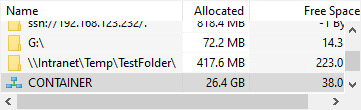
The List of Scans shows an overview of all scanned root directories located in the currently connected database. General information about the root directories like allocated space, free space, number of files and size growth are shown here. You can show/hide additional information in the list by the context menu of the lists header. It is located below the directory tree list. You can show/hide this list by "View > Show List of Scans".
The "Scans"-Ribbon and the context menu offer some basic scan functionality ("Scan Directory Now" and "Delete Scan from Database"), which are known from the "Configure Scans" dialog. Additionally included are some other functionalities like export functions ("Copy to Clipboard" and "Save List...") and also the full Windows Explorer context menu.
Context tab: List of Scans
The List of Scans has its own Ribbon context tab providing several additional actions for the listed scans.

The following commands are available on the "List of Scans" tab:
Delete Scan from Database |
Deletes the scan from the database. |
Scan Directory Now |
Executes a new scan. |
Configure Scans |
Opens the Configure Scans dialog of SpaceObServer where you configure the scans. |
Update List of Scans |
Refreshes the list of scans and updates its information. |
Save List |
Exports the contents of the list view to a file. If two or more items are selected, only the selected items will be exported. Available file formats are "Text Files (.txt)", "Comma Separated Values (.csv)" and "Microsoft Excel (.xlsx)". |
Copy to Clopboard |
Sends the content of the list view via email. |
Print list of scans |
Exports the contents of the list to the clipboard. If two or more items are selected, only the selected items will be exported. |