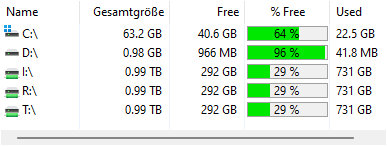
The Drive List shows the local drives as well as the connected network drives. You can see the size of the drive as well as the free disk space. The S.M.A.R.T. column offers a quick info about the health and hardware status of supported devices.
Double-clicking starts a scan of the selected drive.
Notes
•S.M.A.R.T. is available only for local drives supporting the S.M.A.R.T. standard (Self-Monitoring, Analysis and Reporting Technology). Windows grants access to these values only to processes that have been started "as administrator" and if the installed driver supports this.
•Additionally to the listed drive UNC paths can be added using the right click menu.
•You can use wildcards when defining the paths to be scanned. This way, you can even scan paths like "S:\Users\R*" or "R:\*\MyVideos".
•You can scan all shared drives in your network by entering \\* in the drive combo box.
•The drive list can be automatically exported into an Excel, Text, or CSV file by using the command line option "/EXPORTDRIVESLIST".
Context tab: Drive List
The Drive List has its own Ribbon context tab providing several additional actions for the Drive List.

The following commands are available on the "Drive List" tab:
Properties |
Shows the properties for the selected drive. |
Open in Windows Explorer |
Opens the currently selected drive(s) in the Windows Explorer. |
Remove from list permanently |
Removes the selected path or drive permanently from the list. |
Map network drive |
Opens the Windows "Map Network Drive" dialog. |
Add drive or UNC path |
Enables you to select or enter a path or drive and add it to the drive list. |
Add all shares of a server |
Adds all shares of a server to this list as UNC paths. |
Export |
Exports drive list information (path, size, free space, etc.) to an Excel or text file. |
Copy list to clipboard |
Copies drive list information (path, size, free space, etc.) to the clipboard. |
Import from clipboard |
Imports all paths currently contained in the clipboard into the drive list. |
Prints drive list information (path, size, free space, etc.). |
|
Show drive names |
Activate this option to show the names assigned to the drives in Windows, additionally to the drive letters. |