The Extensions view shows information on size grouped by file types, thus granting an overview of the types of files that use up most of the disk space. Statistics on file extensions can be activated and deactivated in the Options dialog.
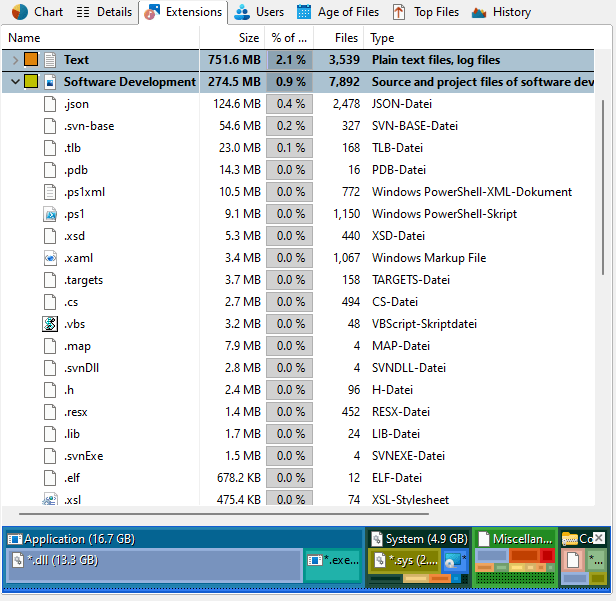
Context tab: Extensions
Use the Extensions tab in order to select specific information for viewing and sorting the data. In addition to these filtering options, the tab also provides commands to export the list contents.

The following commands are available on the "Extensions" tab:
Show files of this extension |
Show a list of all files of the selected file type. |
Filter by this ... |
Show only files with the selected file extension or files that belong to the selected file type group. |
Clear filter |
Remove the filter from the tree and show size information for all file types. |
Add column for this [...] to the Details list |
Adds a new column to the Details list, which shows how many files of the selected extensions exist within the current directory. |
Export Extensions |
Save the contents of this list to a file. If multiple items are selected, only the selected items will be saved. Available file formats are "Text Files (.txt)", "HTML Files (.html)", "Rich Text Format (.rtf)", "Microsoft Excel (.xlsx)", and "Comma Separated Values (.csv)". |
Send the content of the "Extensions" view via email. |
|
Copy to Clipboard |
Copy the content of this list to the clipboard. If multiple Items are selected, only the selected items will be copied. |
Print right pane |
Print the contents of this list. |
Select all |
Select all items in the list. |
Select none |
Unselect the list items. |
Invert selection |
Invert the selection. |
Show chart |
Turn on or off a chart that shows the distribution of file extensions. |
Group file types |
Group similar file types in one group (e.g. "Audio Files", "Video Files", or "System Files"). You can configure the file groups in the Options dialog (See: "Options > View > File Groups"). |