The Details provides an Explorer-like list of files and folders that are contained in the current selected item in the Directory Tree.
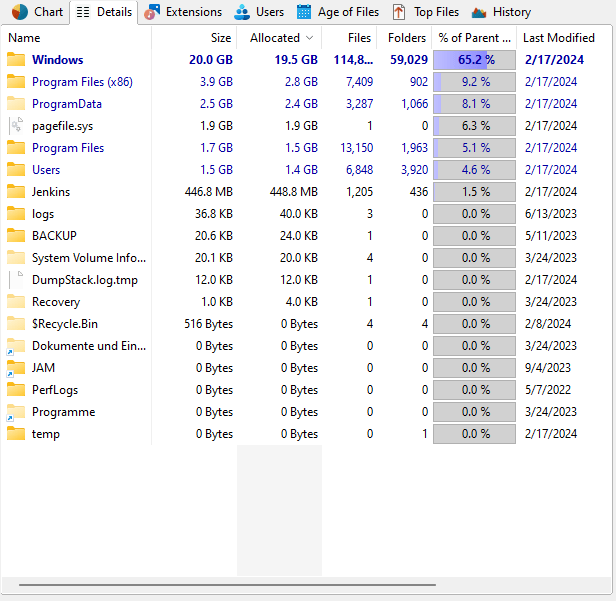
More Columns
Detailed information on each file or folder can be shown by selecting the desired attribute in the column list, available by right-clicking the header of the list. Individual file types, users or Age of files intervals can be added as columns as well. To do so, right click on the extensions, user, or interval and select "Add column ... to Details". These columns will be exported as well, if in the Options the checkbox "Use same columns as in Details view" is checked.
Context tab: Details
Like every view in TreeSize, the Details view comes with a Ribbon tab that is activated when the the list is clicked. The Ribbon tab provides commonly used list functions such as select operations or export features.

The following commands are available on the "Details" tab:
Delete |
Deletes the selected items. Hold the "Shift" key to remove the item(s) from the disk permanently (Please note: You cannot recover files that have been removed permanently!). |
Properties |
Shows the properties for the selected item. |
Move/Copy |
Opens a dialog for the execution of file operations. The dialog allows to move the selected items to another location. It also provides functionalities to archive, copy, or delete them, using a variety of additional options, such as the creation of a log file of the operation. |
Bulk Rename |
Opens a dialog that allows to rename multiple files at the same time. |
|
|
Export Details |
Exports the contents of the "Details" view to a file. If two or more items are selected, only the selected items will be exported. Available file formats are "Text Files (.txt)", "HTML Files (.htm)", "Rich Text Format (.rtf)", "Microsoft Excel (.xlsx)", and "Comma Separated Values (.csv)". |
Sends the content of the "Details" view via email. |
|
Copy to Clipboard |
Exports the contents of the "Details" view to the clipboard. If two or more items are selected, only the selected items will be exported. |
Print right pane |
Prints the selected items of the "Details" list. |
|
|
Select all |
Selects all items in the list. |
Select none |
Unselects the list items. |
Invert selection |
Inverts the selection. |
|
|
Open command prompt |
Opens command prompt at the current directory of the "Details" view. |
Open in Windows Explorer |
Opens Windows Explorer and shows the parent folder of the currently selected items in the "Details" view. |
Compress |
Compresses this file or folder using NTFS compression. |
Decompress |
Turns off NTFS compression for this file or folder. |
Copy path |
Copies the path of the selected items to the clipboard. |
Preview pane |
Enables or disables the preview pane, which shows the content of the selected file in the "Details" list. |
Context Menu on the Details view
The list on the Details view shows the Windows Explorer context menu when you right-click on an item. An additional submenu labeled TreeSize is included which shows all information that is available about the selected item including the columns that are currently not activated. This submenu may also be used to activate or deactivate columns (for a description of available columns, see here).