The Ribbon Bar provides access to all commands of the TreeSize File Search. It is divided into the following logical sections, called "Tabs":
Enables you to select folders to search in and load or save your search results and search options. |
|
Contains the most commonly used actions and elements of the TreeSize File Search. |
|
Contains all actions and elements influencing the general appearance of the search results. |
|
Contains useful functions and settings of the file search. |
|
Provides common help features, version information, and management functions for your product license |
File
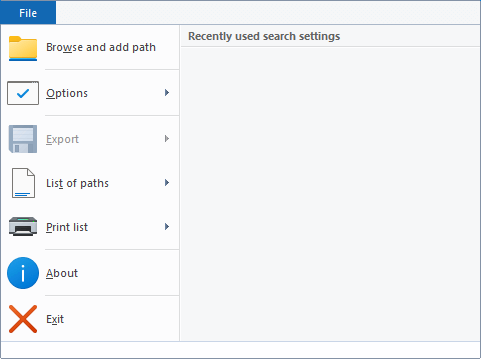
Browse and add path |
Shows a dialog which lets you select a directory. The directory will be added to the list of drives and paths TreeSize will search in. Please note: Use "Home > Search paths" to see the complete list of searched drives and paths. |
Search settings |
Allows to Save the current search options to an XML file, load a previously exported options file, or to reset the current settings to their factory default. |
Export |
Saves the results of the latest search to a configurable file format. Available file formats are "Text files (.txt)", "CSV files (.csv)", "Microsoft Excel (.xlsx)", "Rich Text Format (.rtf)", "HTML (.html)", "PDF (.pdf), and email. |
List of paths |
Exports a list of the full paths of your current search results ("Export path list") or import a list ("Import path list") in the format Text or CSV (mandatory). |
Print list |
Prints the currently visible result list or configure printer settings. |
Options |
Opens the options dialog, which allows to change the current search settings. |
About |
Shows version number and contact information. |
Exit |
Exits the TreeSize File Search. |
Home

Search |
|
Start |
Starts the file search. |
Stop |
Stops the file search. |
Export |
|
Export |
Saves the results of the latest search to a configurable file format. Available file formats are "Text files (.txt)", "CSV files (.csv)", "Microsoft Excel (.xlsx)", "Rich Text Format (.rtf)", and "HTML (.html)", and "PDF (.pdf)". You can also export a list of paths for the current search results. This list can be imported back into the file search at a later point in time, without having to perform a potentially long running search again. This also works for duplicate search, which will be exported including their group structure, if the option "General > Export > Export path list > Include duplicate groups" is enabled. |
Sends an email that contains the current search results. |
|
Organize |
|
Delete |
Deletes all checked search results. See "File operations". |
Move/Copy |
Moves all checked search results to a destination of your choice. See "File operations". |
Bulk rename |
Opens the renamer dialog, which allows to rename all checked items simultaneously, using different rulesets which determine the new name of the files and folders. |
Search Options |
|
Options |
Opens the options dialog, which allows to change the current search settings. |
Customize filter |
Allows to customize the set of filters that can be applied globally, to any of the search types. |
Operations

Export |
|
Export |
Saves the results of the latest search to a configurable file format. Available file formats are "Text files (.txt)", "CSV files (.csv)", "Microsoft Excel (.xlsx)", "Rich Text Format (.rtf)", and "HTML (.html)", and "PDF (.pdf)". You can also export a list of paths for the current search results. This list can be imported back into the file search at a later point in time, without having to perform a potentially long running search again. This also works for duplicate search, which will be exported including their group structure, if the option "General > Export > Export path list > Include duplicate groups" is enabled. |
Sends an email that contains the current search results. |
|
Organize |
|
Delete |
Deletes all checked search results. See "File operations". |
Move/Copy |
Moves all checked search results to a destination of your choice. See "File operations". |
Deduplicate* |
Use this button to replace all but one checked duplicate files by NTFS hardlinks. You can find further details about deduplicating files in this chapter. |
Bulk rename |
Opens the renamer dialog, which allows to rename all checked items simultaneously, using different rulesets which determine the new name of the files and folders. |
Archive |
Archives all checked search results in a ZIP file. See "File operations". |
Pass to executable |
Passes the full path of all checked search results via command line to an executable of your choice. See "File operations". |
Change File Owner |
Allows to change the owner of all checkmarked elements at once. |
List Actions |
|
Check |
Contains actions that allow to check multiple items in the active result list at once. |
Uncheck |
Contains actions that allow to uncheck multiple items in the active result list at once. |
Lock |
Prevents search results from being checked. This means, they will be excluded when using the checkbox that checks all files and can't be checked manually either. |
Sort by checkstates |
Sorts all elements according to their current checkstate, so that all checked elements will be displayed next to each other, in the result list. |
Remove |
Contains a selection of options, which allow to remove specific files or folders from the list of search results again. |
Ensure one unchecked file per group* |
Activate this option, if you want to ensure that one file per duplicate group remains unchecked. This can be useful when using a custom selection mechanism, such as "Check if", to ensure that at least one of the duplicate files will not be included in a move or delete operation. |
Edit |
|
Cut |
Removes the selected items and copies them to the clipboard. |
Copy |
Copies the selected files and folders to the clipboard. To insert them in a new location, use the "Paste" command. |
Select all |
Selects all items in the list. A drop-down menu provides access to the additional button "Invert selection", which will invert the selection state of all search results. |
*This action is only available if the duplicates search is currently selected on the left side of the main window.
View

Tools

Tools |
|
Options |
Opens the options dialog, which allows to change the current search settings. |
Schedule current search |
Opens a dialog enabling you to create a scheduled Windows task for the current search options. The drop-down menu provides access to the additional button "Manage scheduled tasks", which allows you to edit previously created TreeSize tasks. See "Schedule Dialog". |
Start as Administrator |
Restarts the TreeSize File Search and requests admin privileges. Please note: This button is available only if TreeSize was started without administrator privileges. |
Create portable installation |
Creates a portable instance of TreeSize on a removable device |
Empty recycle bin |
Deletes all items in the recycle bin to free up disk space. |
Help

Help |
|
Show help |
Opens the "File Search"-specific help file. |
Show PDF manual |
Open the product manual as PDF (optimized for printing). |
File Search F.A.Q. |
Opens the "File Search"-specific F.A.Q. section in the help file. |
Version |
|
About |
Provides information about TreeSize. |
Check for Update |
Checks for a newer version of TreeSize. |
What is new? |
Shows the changes that were introduced with each new version of TreeSize. |
License |
|
Extend maintenance |
Extends the maintenance period. Updates and support are free within the selected maintenance period. |
Please Note: For the trial version of TreeSize, the Ribbon group "License" contains different controls:
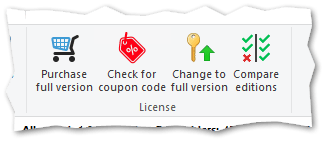
Purchase full version |
Navigates to the JAM Software website and shows a list of all available license models. |
Change to full version |
Helps you switch to the full version after purchasing the software. |